Step-by-Step Guide to Integrating a Third-Party API
Learn the critical steps before wiring up an external API to production.

Roughly seven in ten digital businesses now consume third-party APIs just to run normal operations, and among big enterprises that number cleared 90% by 2025. So integrating an external API isn't a side quest anymore; it's the main quest, and most developers are playing it without the right preparation.
The reason it feels hard: nearly 90% of developers expect API usage to keep climbing as companies pile on cloud and AI workloads, and AI-related traffic through tools like Postman jumped 73% in a single year. The market for integration infrastructure is set to balloon from $15.63 billion in 2025 to $78.28 billion by 2032. Everyone is building this infrastructure right now, and most of it is being built for the first time. The gap between an integration that technically works and one that survives production traffic is where almost every real failure starts. Here's how to close it, step by step.
Assess a Third-Party API Before Coding
Every API you bolt onto your system brings its vendor's problems with it. Their downtime and support ticket queue become yours too. Before any code gets written, a few questions need real answers, not assumptions.
Is the vendor stable, with a track record on uptime and a funding situation that won't evaporate next quarter? How does it handle versioning, and will old versions vanish without warning? What are the rate limits, and do they support the volume you're planning for at scale, not just in the demo? Is there a sandbox to test in before touching production data? And does the authentication model match what your security team will actually sign off on?
Documentation quality tells you almost everything before you even test the API. Thin docs, stale examples, and dead links to already-deprecated endpoints are warning signs of a poorly maintained product. Pricing deserves the same scrutiny: per-call, per-seat, and tiered models can all look cheap in a dev sandbox and turn into a significant budget line item once production traffic hits.
Security posture matters more than most teams weigh it. The vast majority of organizations, by some counts around 95%, have hit API security problems in production at some point. Picking a vendor with a documented, clear security stance reduces the risk you're inheriting before request number one goes out the door. The output of this whole phase should be specific: which API, which version, which auth model, written down before anyone opens an IDE.
Read API Docs as a Structured Exercise
Docs aren't background reading you skim; they're the contract, and skimming them tends to cost you later, usually right after a deploy.
Read in this order: authentication first, because nothing else matters until you can get in the door. Then the endpoint reference, so you know which resources exist, which parameters are required versus optional, and what shape the responses actually take. Then error codes, since plenty of APIs invent their own error semantics that don't match standard conventions. Then rate limits and quotas, noting whether they reset per minute, per day, per key, or per user. Then the versioning policy, and finally the changelog, which tells you how this provider actually treats people already depending on them.
Write notes directly into the codebase as you go, with inline comments pointing at specific doc pages. It saves the next developer from re-discovering why some header is set to a value that looks like a typo but isn't.
Flag anything ambiguous: token expiry behavior, how pagination handles an empty last page, what happens when a rate limit resets. Test those edge cases directly rather than assuming the docs are accurate. Set up the sandbox during the reading phase, not after. Reading a doc claim and testing it in the same sitting is how you catch the gap between what's written and what's true.
Match Authentication to Your Real Security Needs
Authentication is not boilerplate. In 2025, Verizon's Data Breach Investigations Report found that 78% of web application breaches involved stolen credentials or broken authentication.
A quick tour of the options, and where each one actually fits:
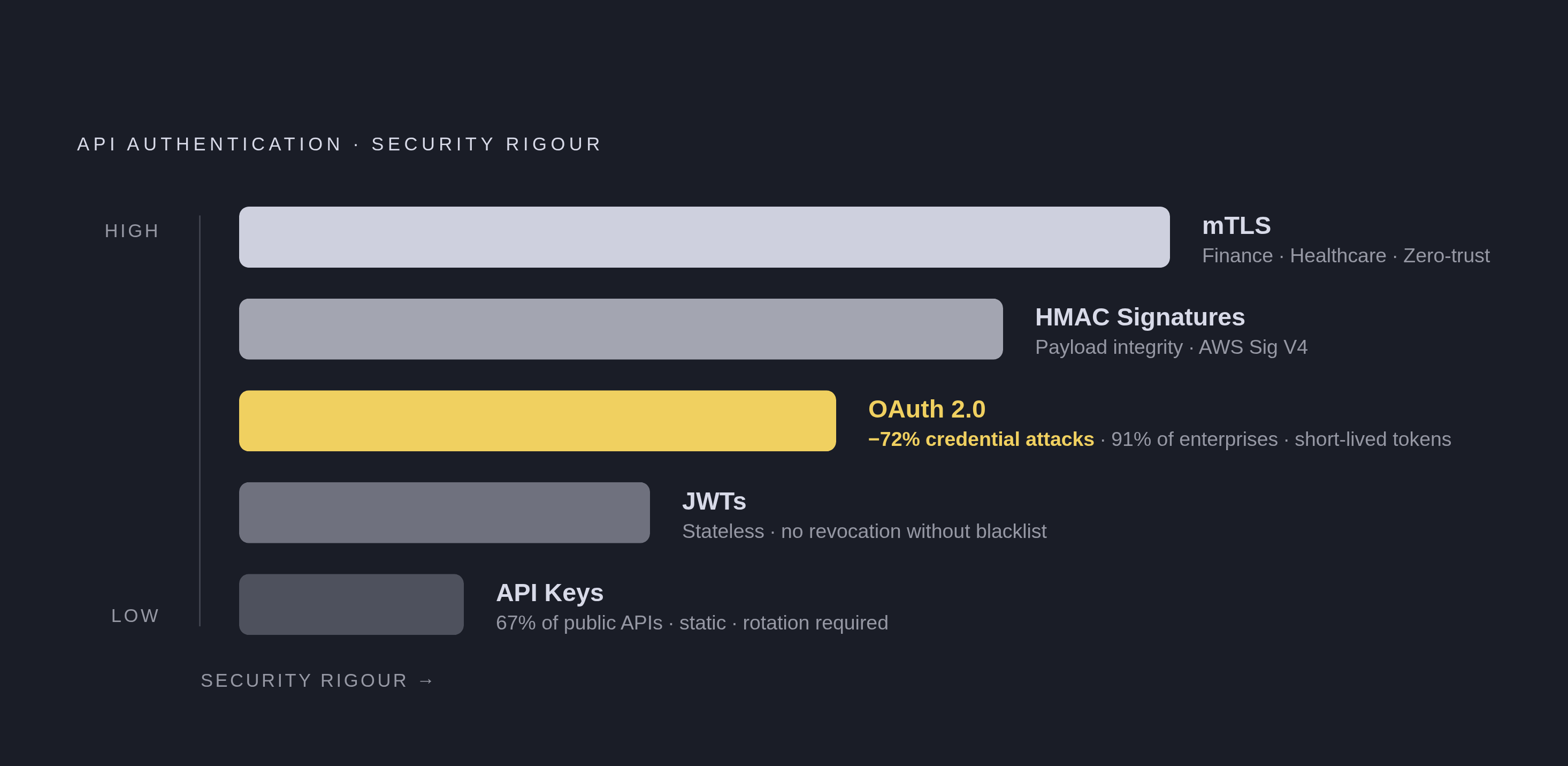
API Keys are the simplest to implement, and RapidAPI's 2024 State of APIs Report put their use at roughly 67% of public APIs. The catch is that they're long-lived and static, which makes them a target. Rotate them on a schedule, and never let one sit in client-side code or get committed to version control.
OAuth 2.0 is the standard for delegated access, and Okta's 2025 Businesses at Work Report found 91% of enterprises use OAuth 2.0 or OpenID Connect for at least one integration. Short-lived tokens shrink the window an attacker has to work with; Salt Security's 2025 API Security Report pegged the reduction in credential-based attacks at 72% compared to static keys.
JWTs are stateless, which is useful for microservices that don't want to hit a database on every request, but a JWT can't be revoked once issued without maintaining a blacklist, which defeats the purpose of being stateless.
mTLS requires both sides to prove identity with certificates, and it's the right call for finance, healthcare, or any zero-trust setup. HMAC signatures sign the payload itself, protecting against tampering in transit; AWS Signature V4 is the best-known implementation of this pattern.
Match the method to the actual threat model, not to whatever's fastest to wire up. OAuth 2.0 covers most third-party integrations. API keys work for internal, low-sensitivity services with strict rotation in place. mTLS is appropriate when compliance demands it. Credentials belong in environment variables or a secrets manager, never hardcoded, and code review should enforce that without exception. Scope access to the minimum the integration needs, so a stolen token opens one door instead of the whole system.
Structure Requests and Parse Responses Defensively
Get one minimal request working in the sandbox before building any abstraction on top of it. Confirm the auth flow works, confirm the headers behave, and confirm the response looks like what the docs promised.
A few basics on constructing the request: set Content-Type and Accept headers explicitly, because relying on defaults is how you get an XML response back when your code is expecting JSON. Understand which pagination style you're dealing with, cursor-based, offset-based, or page-token, since each needs its own loop logic and they are not interchangeable. For anything that writes data, check if the API supports idempotency keys; they prevent a retried request from creating the same record twice.
On the response side, parse defensively. Don't assume a field will always be present just because the docs list it; fields go missing, especially in edge cases. Log the raw response while building, then strip anything sensitive before that logging pattern follows you into production. Map the API's error codes onto your own application's error categories early, because retrofitting that mapping after the fact is expensive and always happens under time pressure.
Data that doesn't change often, such as reference lists, catalog items, and configuration values, shouldn't be fetched fresh on every call. Set the cache time-to-live based on how fresh the data actually needs to be. For static, public responses, a CDN can serve them from closer to the user, cutting latency and reducing load on the origin API. Every cache hit is also one less request counting against your rate limit.
Build Error Handling and Rate-Limit Resilience Early
Errors will happen. The only real question is whether they hit the user directly or get absorbed by the integration layer before anyone notices.
Split errors into three buckets: client errors (4xx, meaning your request was wrong), server errors (5xx, meaning the provider's side broke), and network errors, which are their own category. Each needs a different response. Never pass a raw API error message straight to an end user; translate it into something meaningful to them. Log with enough detail to reproduce the failure later: endpoint, parameters (redacted where needed), the response body, and a timestamp.
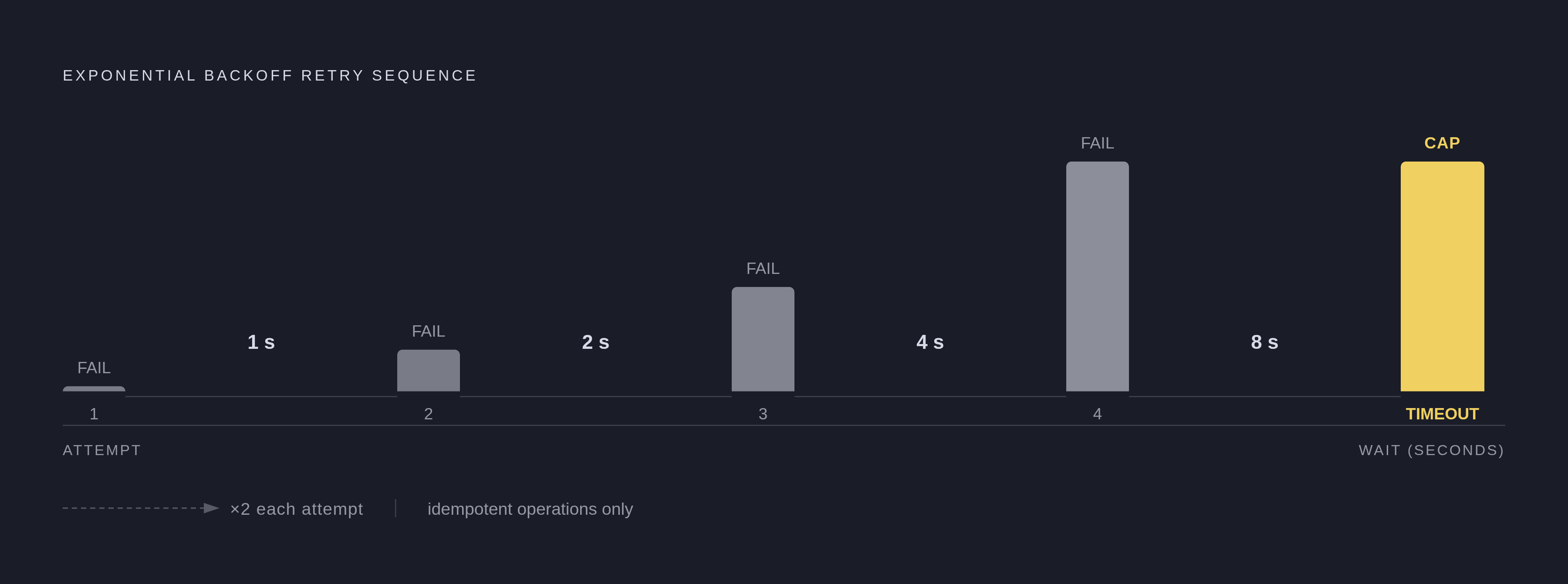
Retry logic follows a well-established pattern: exponential backoff, waiting 1 second, then 2, then 4, then 8, rather than hammering a rate-limited endpoint immediately after it told you to back off. Cap the retry count and set a hard timeout, because an infinite retry loop can cascade into a much larger outage. Only retry idempotent operations, or ones backed by an idempotency key; retrying a non-idempotent write is a reliable way to create duplicate records.
Rate limiting algorithms vary by provider. Fixed Window, Sliding Window, Token Bucket, and Leaky Bucket each handle bursts of traffic differently, so knowing which one the provider uses changes how aggressively you can safely send requests. Respect 429 responses and the Retry-After header when it's provided, and track request counts on your own side so you're not discovering the limit by hitting it.
If a provider is clearly experiencing problems, stop sending it requests for a defined interval instead of continuing to pile on. That protects your own system from cascading failure and reduces additional load on a service that's already down.
Version Defensively So Upstream Changes Don't Break You
APIs evolve. New features ship, bugs get patched, formats shift, and without a versioning strategy on your end, someone else's routine update becomes your incident.
REST APIs usually version through the URL path, something like api.provider.com/v1/resource, or through a header like Accept-version: v1. Either approach lets old and new versions run side by side. GraphQL evolves one schema additively instead of running parallel versions; deprecated fields keep working while clients migrate off them, but that still means someone has to be watching for deprecation notices instead of assuming silence means safety.
Not every change is dangerous. Adding a new optional field, adding a new endpoint, and adding an enum value your client ignores are all safe. Removing or renaming a field, changing a field's data type, tightening validation, and changing default behavior are all breaking, and all capable of taking down an integration that was working fine the day before.
Subscribe to the provider's changelog or developer newsletter, since most breaking changes get announced ahead of time for anyone paying attention. Pin to an explicit version in production and never ride on a "latest" alias. Parse responses permissively, ignoring unknown fields instead of throwing on them, which is what actually makes non-breaking changes non-breaking on your end too. Put deprecated fields on a calendar, plan the migration, and complete it before the sunset date.
Test Across Unit, Integration, and Contract Layers
Three layers of testing each catch a different category of failure, and skipping one leaves a blind spot.
Unit tests mock the API's response and check your own parsing, error handling, and retry logic in isolation. They are fast, predictable, and run on every commit. Integration tests hit the real API or its sandbox and run the full request-response cycle, authentication included; they are slower, but they catch the gap between what the docs said and what actually happens. Contract tests check that the response still matches the schema your code assumes; these are what catch a breaking change before your users do.
Postman remains the dominant testing platform, with a user base north of 30 million and a free tier that covers most individual or small-team needs; its AI-assisted test generation reportedly reduces manual test writing by around a quarter. Bruno stores collections as plain files in Git, so teams already living in Git get collaboration without a paid plan. Insomnia is open-source and covers REST, GraphQL, gRPC, WebSocket, and Server-Sent Events, useful when an integration spans more than one protocol. Hoppscotch, HTTPie, and Thunder Client are lighter tools suited to quick, exploratory checks. Surveys tracked by autemos.com found 82% of teams now work API-first, up from 66% the year before, and the tooling growth tracks that shift closely.
Test edge cases deliberately. Rate limit responses and retry behavior afterward. Malformed or partial responses. A token expiring mid-session. A provider that's slow but not down. An empty result set that breaks pagination logic. Run the full suite in CI, with integration tests required to pass, not just unit tests.
Monitor Production for What Testing Cannot Catch
Testing proves the integration works. Monitoring tells you the moment it stops, and those are genuinely different jobs; passing tests say nothing about what happens six months into production traffic.
Latency per endpoint needs a baseline set at launch, because a slow upward creep is often the first sign of provider-side trouble long before users start complaining. Error rate by status code matters just as much: a rising share of 5xx responses from the provider's side is an early warning of an outage that hasn't been announced yet. Watching these numbers is the difference between finding out from a dashboard and finding out from an angry customer.
Sources
- https://kordu.tools/blog/api-authentication-methods-compared/
Supplied the statistics on API key prevalence (67% of public APIs), OAuth 2.0 enterprise adoption (91%), and the 72% reduction in credential-based attacks attributed to short-lived tokens.