Salesforce Integration Architecture Patterns
Pick the right integration pattern before choosing your tools, or waste months rebuilding.
Most Salesforce integration projects don't fail because your team was technically incompetent; they fail because someone picked a familiar tool instead of the right pattern. Think of it this way: choosing your integration tool before your integration pattern is like picking up a hammer and then deciding what to build. You might end up with a house, but you're far more likely to end up with a very expensive pile of nails.
The numbers are worth sitting with for a moment. According to MuleSoft's 2025 Connectivity Benchmark Report, which surveyed 1,050 IT leaders alongside Vanson Bourne and Deloitte Digital, the average enterprise now runs 897 applications. Organizations managing AI agents run 1,103. Despite that sprawl, only 29% of enterprise applications are actually integrated. The rest operate in isolation, which is why 80% of organizations name data silos as their biggest barrier to automation and AI goals. Meanwhile, 39% of IT team time goes to building and maintaining custom integrations rather than core product work.
The problem isn't a shortage of smart engineers. It's the absence of a framework. What follows is that framework, walked through in the order your architecture decisions actually unfold: first principles, then pattern selection, then topology, then API choice.
Stop, Think, Write
Every Salesforce integration decision is governed by three variables. Get these wrong before you write a line of code and everything downstream suffers.
Data volume. How many records are moving, and how often? Hundreds per day versus hundreds of millions per month changes everything about what you build.
Latency tolerance. Does the calling system need an immediate response, or can it fire a request and move on? This is the fork in the road between synchronous and asynchronous design.
System topology. How many systems are involved? Which one is the system of record? Who owns the data, and who is just consuming it?
Salesforce's official reference, Integration Patterns and Practices (Version 66.0, Spring '26), organizes integration behaviors into three categories before naming a single specific pattern:
Synchronous. The caller waits for a response before proceeding.
Asynchronous. The caller fires and moves on.
Batch. Large volumes processed on a schedule, not in real time.
Choosing the wrong category is the root cause of most integration brittleness. A synchronous call into a slow external system blocks Salesforce transactions. A batch job where you need real-time data produces stale records and frustrated users. Let the pattern determine the technology, not the other way around.
The Five Patterns Salesforce Architects Use
Salesforce's own consulting architects use these five patterns as reference points during architectural reviews. The goal, when any of them is implemented correctly, is to reach production as quickly as possible with the most stable, lowest-maintenance application set you can build.
Pattern 1: Remote Call-Out (Synchronous Request-Reply)
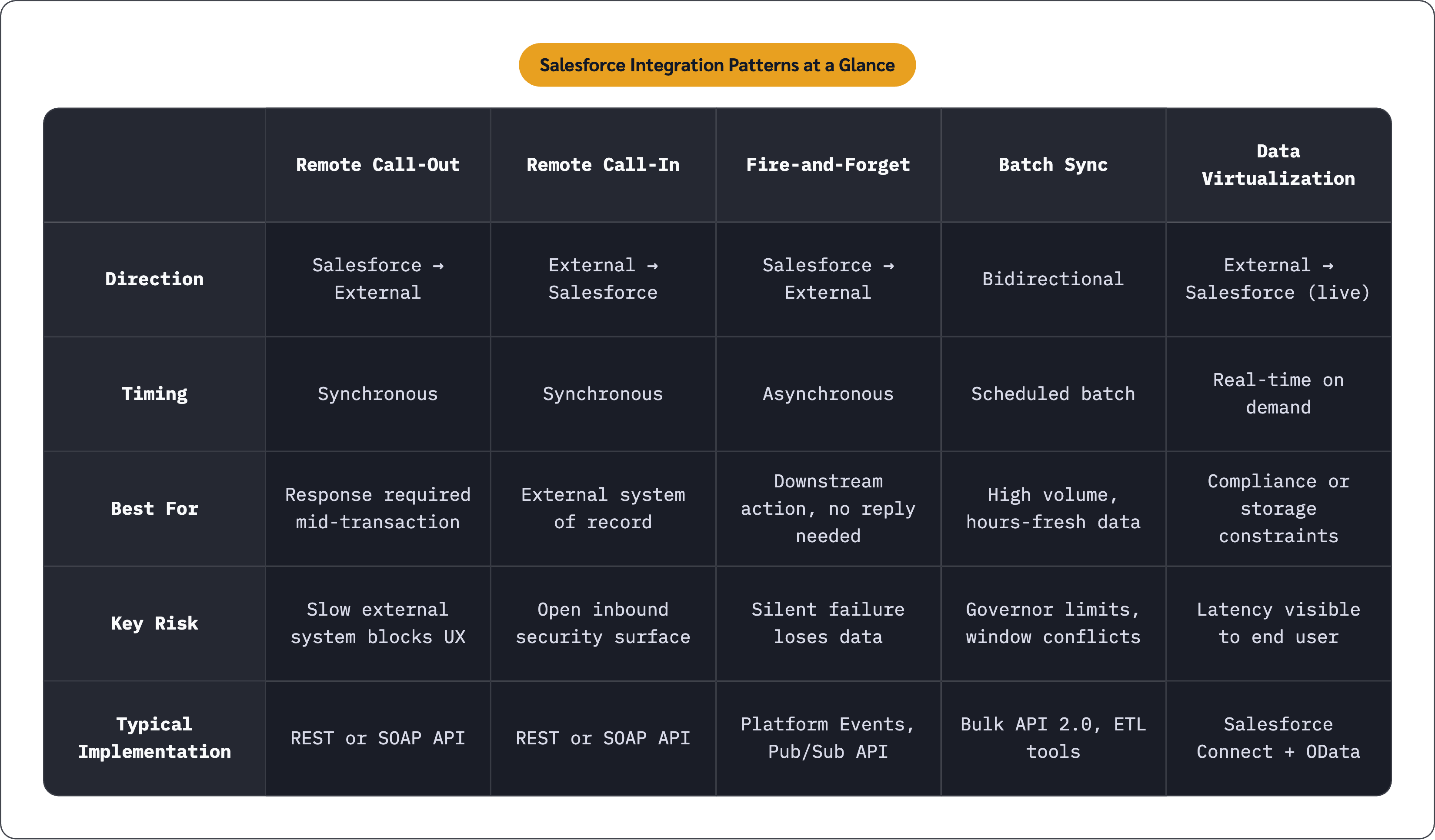
Salesforce initiates a call to an external system and waits for a response before proceeding.
The canonical example is verifying customer credit status from an external financial system at the moment a record is created. Implementation is typically REST or SOAP API, outbound from Salesforce.
The risk that bites people most often: the external system's response time directly affects Salesforce transaction performance. A slow downstream system creates a slow user experience, full stop. Choose this pattern only when the response data is required before the Salesforce transaction can complete. If your transaction can finish without waiting, something else is a better fit.
Pattern 2: Remote Call-In (Inbound Push)
An external system pushes data into Salesforce. The external system is the system of record. Salesforce is the consumer.
A common example is an ERP writing order status back to Salesforce Opportunities after fulfillment. Salesforce REST or SOAP API handles the receiving end.
The thing people underestimate here is the security surface. The moment you open Salesforce to inbound pushes, input validation and authentication controls become non-negotiable. This pattern makes the most sense when your authoritative data genuinely lives outside Salesforce and Salesforce is displaying or acting on it rather than producing it.
Pattern 3: Fire-and-Forget (Asynchronous)
Salesforce sends a message and moves on. No response expected, none waited for.
Emitting a Platform Event when an Opportunity closes, consumed downstream by an analytics system or a fulfillment queue, is the textbook case. Implementation options include Platform Events, Queueable Apex, and Future Methods.
The failure mode worth planning for upfront: if the external system fails silently, you lose data. Don't bolt on retry logic and dead-letter handling later. Build them in from the start. Use this pattern when the downstream action doesn't affect your current transaction and your latency tolerance is measured in minutes rather than milliseconds.
Pattern 4: Batch Data Synchronization
Large volumes of records move between Salesforce and external systems on a schedule. Not real time. Not event-driven. Just a reliable, predictable window of movement.
The classic example is a nightly sync of a product catalog from an ERP into Salesforce Price Books. Data Loader, scheduled Apex jobs, and ETL tools are all reasonable implementation paths.
Two things catch teams off guard. First, batch windows that overlap with peak Salesforce usage periods create contention. Second, Salesforce governor limits actively shape how jobs need to be designed, and discovering that mid-build is painful. This pattern is the right call when your data freshness requirements are measured in hours rather than seconds and the volume is too large for real-time API calls to handle practically.
Pattern 5: Data Virtualization
External data is displayed inside Salesforce in real time without being stored there. The record in Salesforce is a live window into an external system, not a copy of it.
A financial services firm displaying live account balances from a core banking system on Salesforce Account records is a good example. No regulated financial data gets replicated into Salesforce at all. Implementation uses Salesforce Connect with an OData endpoint (an open protocol for querying external data sources via standard HTTP). MuleSoft, Informatica, Dell Boomi, Jitterbit, and Progress Software have all built certified Salesforce Connect adapters.
The constraint that matters most: real-time callout latency is completely visible to the end user. This pattern is a poor fit for high-frequency interactions or slow external systems. It shines when data sovereignty, compliance requirements, or storage costs make replication undesirable but your users still need to see the data in context.
Using Patterns in Combination
You will rarely use just one pattern in a mature architecture. A retail order process, for example, uses fire-and-forget events for fulfillment triggers, batch sync for nightly analytics loads, and data virtualization to surface historical order data from a legacy warehouse. Each pattern handles the data flow it's actually fit for. Your architectural skill lies in knowing which pattern handles which flow, not in finding one pattern to handle everything.
Macro Topology: Choosing the Shape of the Overall Integration
The patterns above describe behaviors. Topology describes the physical and logical structure through which those behaviors are routed. You need to make both decisions, and they interact in ways that matter quite a bit in practice.
Point-to-Point
Salesforce connects directly to each external system with a dedicated, bespoke integration.
This works fine for simple environments with only a handful of connected systems. The problem is mathematical. Five systems means up to ten direct connections. Ten systems means up to 45. "Integration spaghetti" is the industry term for what you end up with: each connection bespoke in construction, undocumented in aggregate, and unpredictable in its failure modes whenever any single system changes. Your codebase becomes a plate of spaghetti — it looks manageable until someone pulls a noodle and everything moves.
Fastest to implement. Highest long-term maintenance cost. Suitable only where scale genuinely won't grow beyond a small number of integrations, and in practice, you are almost always wrong about that assumption.
Hub-and-Spoke
All connections route through a central middleware hub rather than directly between systems.
This dramatically reduces total connection count, centralizes monitoring and logging, and makes governance achievable. It's the right step up from point-to-point when complexity starts to grow, and it fits medium-complexity environments running roughly five to fifteen connected systems.
The structural trade-off is real, though. The hub that simplifies governance also becomes your single point of failure. Hub availability directly determines integration availability. That requires genuine investment in failover and redundancy to work reliably.
Enterprise Service Bus (ESB)
The ESB adds message routing, transformation, protocol translation, and orchestration on top of hub-and-spoke centralization. It's the right architecture for highly complex, enterprise-scale environments where integrations span many protocols, data formats, and business processes.
Highest capability. Highest operational cost. The right call for large enterprises with genuine complexity, and overkill for organizations whose integration footprint doesn't justify the overhead. The hard part is being honest about which category you actually fall into.
How Topology and Patterns Interact
An ESB makes it practical to enforce consistent error handling across all fire-and-forget events. A point-to-point topology makes that same consistency extremely difficult to achieve. The topology decision belongs alongside the pattern decisions, not downstream of them.
API-Led Connectivity as the Unifying Framework for Modern Salesforce Architecture
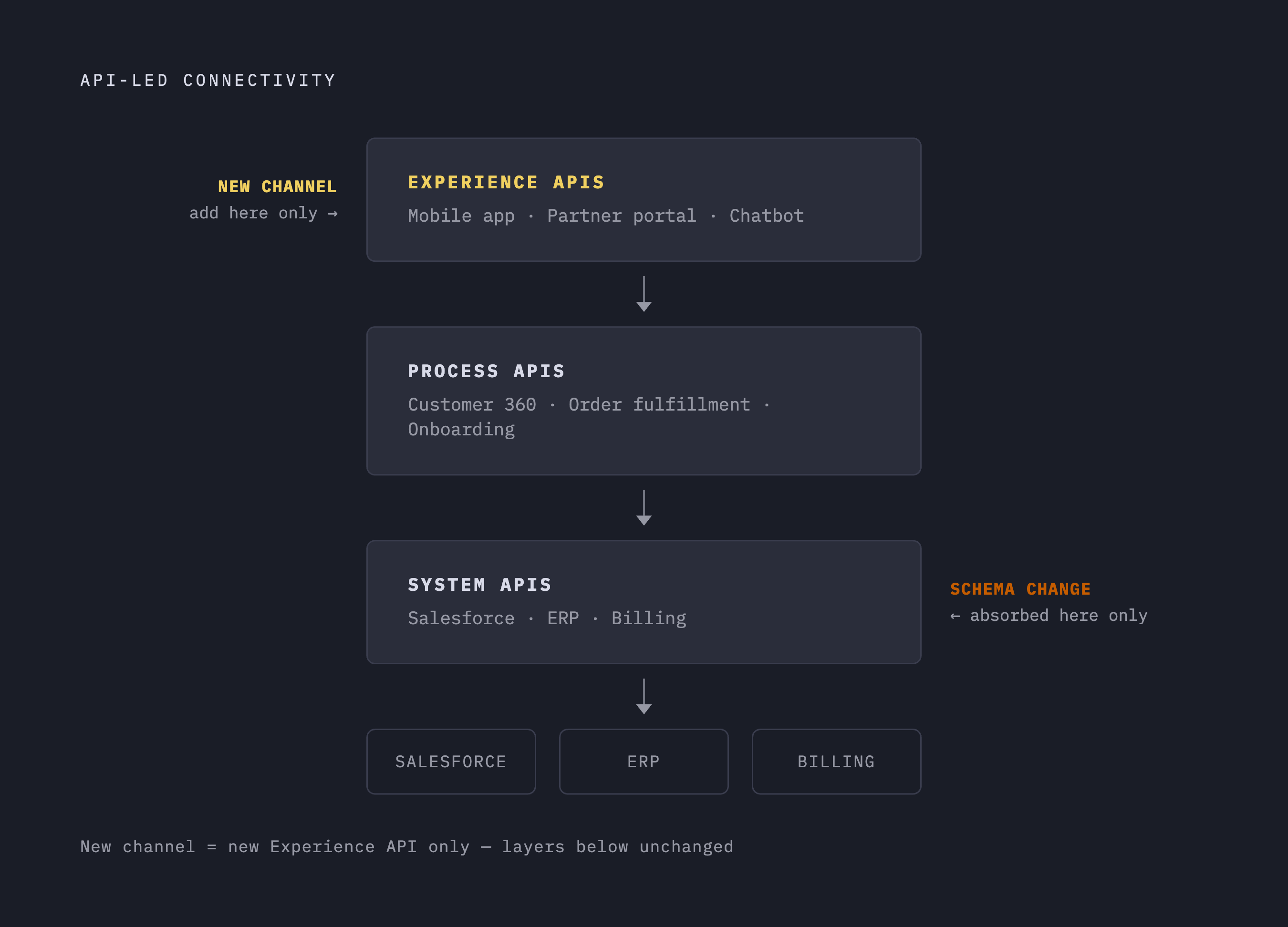
Point-to-point, hub-and-spoke, and ESB describe where connections go. API-led connectivity describes how integrations are designed for reuse, governance, and change. These two dimensions are complementary, not competing. You need both.
The model defines three distinct API layers, each with a specific responsibility.
System APIs sit closest to your source systems: Salesforce, ERP, billing platform, whatever your backend looks like. They expose raw system data in a clean, normalized format and absorb schema changes so nothing above that layer has to change when a backend is updated. The backend changes, the System API adjusts, and everything above it stays unaffected. That's the whole value proposition of this layer.
Process APIs sit in the middle. They pull from one or more System APIs to execute a specific business operation. A "Customer 360" Process API, for example, merges CRM data from Salesforce with billing records and support history to produce a unified view, without any consuming application needing to know those three systems exist separately.
Experience APIs sit at the top. They shape data delivery for a specific channel: a mobile app, a partner portal, a chatbot. Launching a new channel means building a new Experience API, not rebuilding backend integrations. The logic underneath stays untouched.
The maintenance argument for this layering is concrete and, frankly, underappreciated. When a backend system changes its schema, only the relevant System API needs updating. When you launch a new mobile app, you build a new Experience API without touching the Process or System layers. This is why the approach has become the recommended model for enterprise architectures: it converts integration from a web of bespoke connections into a portfolio of reusable components that scale by composition.
The five patterns from earlier map reasonably cleanly onto this model. Remote Call-Out and Remote Call-In typically appear at the System API layer. Fire-and-Forget events often originate at the Process layer. Data Virtualization can substitute for a System API entirely in cases where replication is undesirable.
Matching Salesforce's API Toolkit to the Pattern and Layer You Have Chosen
Salesforce offers more than a dozen integration surfaces. The choice among them isn't arbitrary, and treating it as such is where a lot of implementations go sideways. Each API is optimized for a specific combination of volume, latency, and direction.
REST API. JSON over HTTPS, OAuth 2.0 authentication, full CRUD on standard and custom objects. Fastest for lower-volume operations, easiest to debug, and universally supported across languages and platforms. The default starting point for Remote Call-In and Remote Call-Out patterns at low-to-medium volume.
SOAP API. Contract-driven via WSDL. A solid choice for server-to-server integrations where a formal schema contract is required. Two WSDL variants exist, and the difference between them matters more than most teams realize upfront. The Enterprise WSDL is strongly typed to a specific org's metadata. Tight coupling, requires regeneration after schema changes, appropriate when the integration is permanent and org-specific. The Partner WSDL uses generic SObject types that stay stable across orgs and schema changes. The right choice for ISV products connecting to many different customer orgs.
Bulk API 2.0. The designated tool for large-volume data movement. The official threshold is 50,000 records or more. Asynchronous by design: submit a job, retrieve results separately. It doesn't count against synchronous API limits and supports up to 150 million records per job. The correct implementation path for Batch Data Synchronization at enterprise scale.
GraphQL API. Allows a single query to retrieve exactly the fields and related records needed, eliminating multiple round-trip calls. Retrieving an Account with its related Contacts in one request rather than several sequential calls is a meaningful performance improvement for front-end applications. Well-suited to Experience API layer implementations where channel-specific data shapes vary widely.
Pub/Sub API (gRPC). High-scale, bidirectional event streaming using Apache Avro binary format over gRPC and HTTP/2. Pull-based model with replay support from any position, meaning consumers can reprocess event history when they need to. Supports eleven programming languages via gRPC. This is the modern implementation path for Fire-and-Forget and event-driven patterns at high volume. It's distinct from Platform Events, which use the older Streaming API surface. For new high-throughput event architectures, Pub/Sub API is where Salesforce is pointing.
Platform Events and Change Data Capture (CDC). Platform Events let Salesforce publish business-significant events that any subscriber, inside or outside Salesforce, can consume. CDC automatically publishes record-level change notifications whenever a Salesforce record is created, updated, deleted, or undeleted. Both are foundational to event-driven architectures and map directly to the Fire-and-Forget pattern. Platform Events make sense when you're defining and publishing custom business events. CDC makes sense when downstream systems need to react to data changes in Salesforce without polling.
Streaming API. The older event infrastructure, still in use and still valid for plenty of implementations. Pub/Sub API is the strategic direction for new high-volume event work, but Streaming API remains a reasonable choice for lower-volume event use cases that don't require the throughput or replay capabilities of Pub/Sub.
Work through the decisions in order: variables first, then pattern, then topology, then layering model, then API. Skip to the API selection first and you're just improvising with expensive tools. The sequence isn't ceremony. It's the order in which the decisions actually constrain each other, and respecting that order is what separates an architecture that holds together from one that slowly falls apart.